
Overview
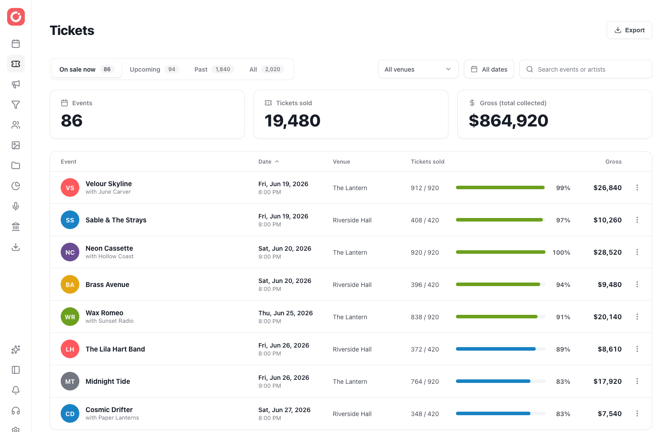
The Tickets Dashboard gives you an at-a-glance view of ticket sales across all of your confirmed events. For each event you'll see tickets sold vs. capacity (with sell-through %), gross revenue, venue, and date — plus totals for everything currently in view.
Getting there
Click Tickets in the left navigation, just below Calendar.
Tabs
Use the tabs at the top to switch between On Sale Now, Upcoming, Past, and All events.
Filters & search
Narrow the list by venue or date range, or search by event name. The summary bar (Events / Tickets Sold / Gross) updates to match whatever is in view.
Sorting
Click any column header to sort — by date, tickets sold, capacity, or gross.
Exporting
Click Export to download a CSV of the current filtered view.
FAQ
- Which events appear here? Confirmed events for the venues you have access to.
- Is this real-time? Yes — the dashboard reads the same live sales data as your event dashboards.
- Can I change an order from here? The Tickets Dashboard is a reporting view. Click into an event to manage orders, refunds, and check-ins.