
What is the Meta Ads integration?
Opendate's Meta Ads integration connects your Facebook and Instagram advertising account to your Opendate workspace. Once connected, Opendate automatically pulls your ad performance data every 24 hours and matches each ad to the corresponding event on your calendar. Spend, impressions, clicks, and reach appear on the Marketing tab of every event — no spreadsheets, no screenshots.
Who should use this?
Anyone on your team running paid ads for individual shows, tours, or on-sale campaigns. It's especially useful for:
- Marketers reporting on per-show ROI
- Owners and GMs reviewing marketing spend by event
- Talent buyers referencing historical marketing performance when making offers
What Opendate can and can't do
We can:
- Read your Ad Accounts, campaigns, ad sets, ads, and daily insights
- Match ads to events based on the ad name (e.g., an ad named "Gorillaz 3/14 Nashville" matches the Gorillaz event on 3/14)
- Display performance on each event's Marketing tab
We can't:
- Create, edit, pause, or spend against your campaigns. The integration is read-only. Opendate requests only the ads_read permission from Meta.
How to connect
- Log into Opendate and go to Integrations (team settings).
- Find the Social Ads section and click Facebook & Instagram Ads.
- Click Connect. You'll be redirected to Meta to log in.
- Grant Opendate the ads_read permission.
- Select which Ad Accounts to sync. (You can add more later.)
- You're done. Your first sync starts within 24 hours.
How matching works
Opendate looks at the name of each ad and matches it against your event calendar using:
- Event name
- Artist name
- Show date
- Venue name (for multi-venue teams)
Ads that match with high confidence are linked automatically. Ads the system isn't sure about are flagged for manual review — you can match them in two clicks.
Tip: Name your ads consistently (e.g., "Artist – Date – Venue") and matching gets faster and more accurate.
Reviewing performance
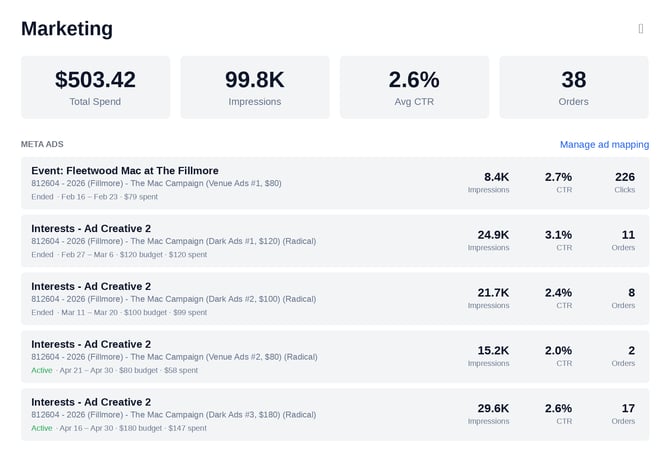
Open any event → click the Marketing tab. You'll see:
- Total ad spend for that event
- Impressions, clicks, and reach
- A per-campaign breakdown
- Daily trend (how spend tracks vs. ticket sales)
Troubleshooting
My ad data isn't showing up. The first sync runs within 24 hours of connecting. If it's been longer, check that the Ad Account is selected in Integrations → Social Ads.
An ad got matched to the wrong event. Go to the event's Marketing tab → find the ad → click "Unmatch" → reassign.
My token expired. Meta long-lived tokens last ~60 days. Opendate refreshes automatically around day 50. If you see a sync failure, reconnect in Integrations.
I don't see the Social Ads section. Your role may not have integration permissions. Ask your workspace admin.
Security & data
Opendate stores only the data needed to power event-level reporting: campaign, ad set, ad, and daily insights. No creative assets, no audience lists, no targeting details. Read-only access, revocable anytime from either Opendate or your Meta Business Suite.
Need help?
Reply to any email from Opendate or reach out to your CS rep.